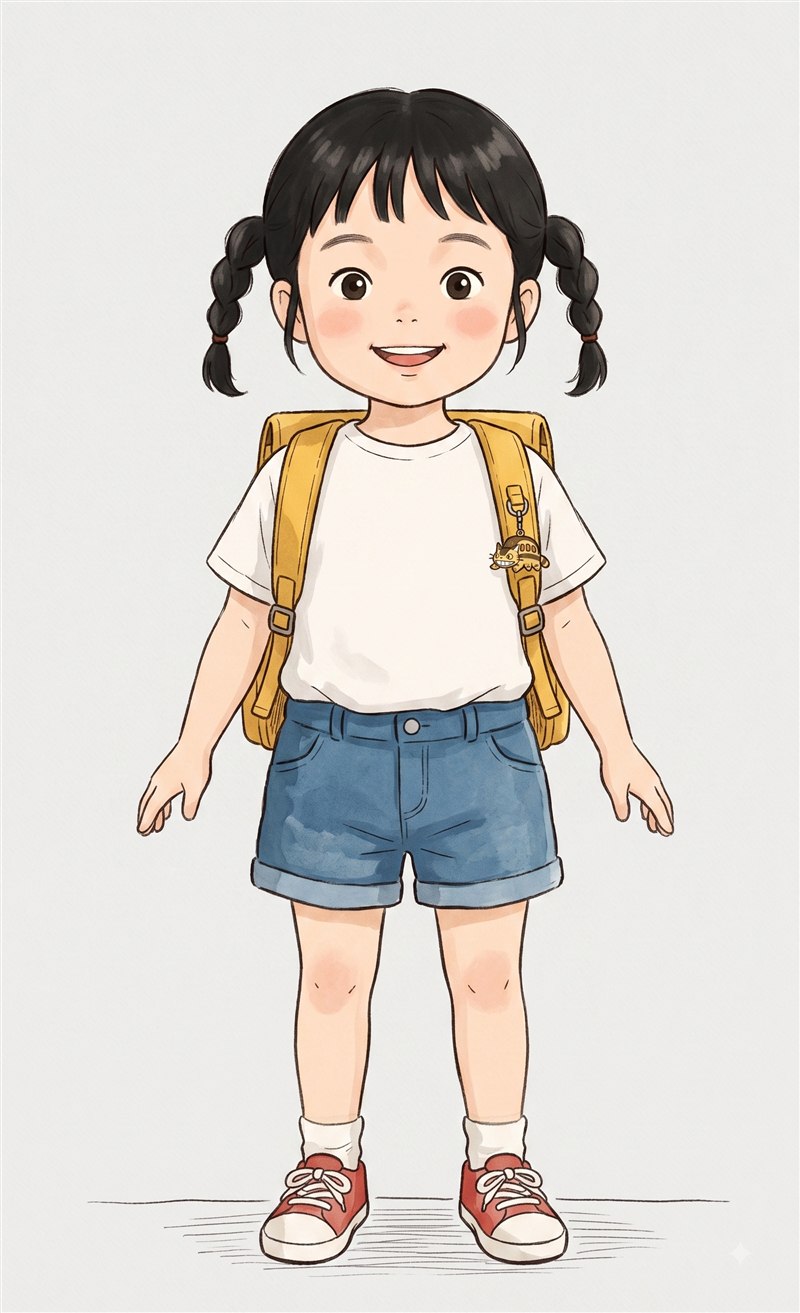
주인공은 처음에 3D 모델이었습니다. 원화를 그리고, 그걸 3D로 세우고, 뼈를 심고,
달리기 동작을 붙였습니다. 8월 20일에 그 모델을 버리고 그림 한 장짜리
스프라이트로 갈아탔고, 8월 22일에 다시 3D로 되돌렸습니다. 이틀
사이의 왕복입니다. 왜 그랬는지 순서대로 적어 둡니다 — 둘 다 이유가 있었고, 둘 다 코드가
남아 있습니다.
모든 것이 시작되는 원화. 코스튬은 이 그림에서 옷만 바꿔 다시 그린다
왜 2D로 갔나 — 배경과 같은 문제
배경 이야기에서 적은 것과 같은 이유입니다. 배경이 손그림 수채화라 어떤 3D
메시도 다른 매체로 보입니다. 길가 소품을 3D로 세웠다가 두 번 물렀던 그 문제가
캐릭터에도 그대로 있었습니다. 다행히 카메라가 늘 캐릭터 뒤에 고정돼 있어서, 정면
그림 한 장을 세워도 판의 약점(옆에서 보면 종이)이 드러나지 않습니다. 그래서 갔습니다.
정지 그림 여러 장으로는 달리기가 안 만들어진다
여기서 배운 것이 가장 큽니다. 처음엔 달리는 자세 여섯 장을 시트 한 장으로 그려
받았습니다. 그림은 예쁜데, 번갈아 재생하면 사람이 바뀌는 것처럼 보였습니다.
모델이 장마다 따로 그려서 팔 위치가 널뛰고, 자세 간격이 불균등해 움짤처럼 끊깁니다.
정지 그림을 아무리 많이 시켜도 이 문제는 안 사라집니다. 시간의 연속성은 영상
모델만 만듭니다.
그래서 원화를 첨부해 "제자리에서 달리는" 짧은 영상을 받았습니다. 요구 사항은 둘뿐입니다
— 제자리 달리기(앞으로 가면 멀어지며 작아져 프레임 크기가 흐릅니다), 그리고 초록
단색 배경(흰 티셔츠와 흰 배경이 안 갈리는 문제를 뿌리째 없앱니다). 그 영상에서 발이
바닥에 닿는 순간을 재서 한 걸음을 잘라내고, 24장으로 고르게 폅니다. 영상은 24fps인데
한 걸음이 8~9프레임뿐이라 모자란 장은 모션 보간으로 채웁니다 — 배경이 단색이라 보간
아티팩트가 낄 자리가 없습니다. 반대 걸음은 좌우를 뒤집어 씁니다. 뒤에서 본 몸은
좌우 대칭이라 뒤집은 것이 그대로 반대 발입니다.
한 칸에 한 걸음이고 초당 3.2걸음이라, 한 걸음 24장이면 주기 48장 = 초당 77장입니다.
렌더링(60fps)보다 촘촘해서 여기가 상한이고, 이 위로 더 넣어도 안 보입니다.
잘라내기와 정렬
오려 내는 도구는 둘을 같이 씁니다. 사람 분할 모델이 대략 찍고, 색 경계에 맞춰
다듬는 알고리즘이 마무리합니다. 하나만 쓰면 안 됩니다 — 색 경계만 보면 흰 티셔츠와
밝은 아스팔트를 같은 색으로 봐서 길바닥 조각이 팔 뒤에 붙어 나오고, 분할 모델만 쓰면
윤곽이 계단처럼 거칠고 등에 구멍이 뚫립니다. 그리고 여러 장의 키를 맞추고 발을 같은
자리에 놓는 정렬 도구를 거칩니다. 빌보드는 프레임마다 기준점을 따로 갖지 않아서, 안
맞추면 발이 좌우로 미끄러지고 키가 들썩입니다.
왜 다시 3D로 돌아왔나
이틀 뒤, 두 번째 게임 「씽씽이 레이서」와 세계관·캐릭터·코스튬을 공유하기로
했습니다. 씽씽이는 세계 전체가 3D입니다 — 아파트 동이 서고, 길이 굽고, 카메라가
코너에서 기웁니다. 거기서 종이 한 장은 종이 세트가 됩니다. 두 게임이 같은 캐릭터
파일을 써야 하니, 둘 다 되는 쪽인 3D로 돌아갔습니다. 되돌릴 자리는 남겨
뒀습니다. 2D 시절에 만든 도구(영상에서 걸음 펴기, 잘라내기, 정렬)는 그대로 있고, 언젠가
학교가는 길만의 그림 캐릭터가 다시 필요해지면 그날 바로 씁니다.
3D로 만들 때 밟았던 것들
색(텍스처)을 먼저 입히고 그다음 리깅. 순서를 바꾸면 애니메이션 파일에
텍스처가 없고, 나중에 색을 이식하면 UV가 어긋나 얼룩집니다.
같은 요청에도 삼각형 수가 3천 개와 3만 개를 오갑니다. 저폴리로 나오면
얼굴이 형태를 못 잡습니다(입 주변이 번지고 눈이 짝짝이). 받자마자 삼각형 수부터
세는 게 필수 절차가 됐습니다. 10만 개로 나오면 반대로 무거워서, 이음매를 고정한
채 3.6만 개로 줄입니다.
가방은 캐릭터에 붙이지 않습니다. 가방이 등 표면 자체로 생성되면 코드로
못 벗깁니다 — 지우면 몸 안이 비치고, 납작하게 눌러도 등을 덮는 판때기가 됩니다(둘 다
해 봤습니다). 그래서 가방·모자·손에 든 물건은 뼈에 매다는 별개 물건으로 만듭니다.
코스튬 N종 × 가방 M종이 파일 N+M개로 성립합니다.
에셋을 바꾸면 파일명도 바꿉니다. 같은 이름으로 덮어쓰면 브라우저와
CDN이 예전 파일을 계속 내줍니다. 가방 없는 체육복을 올렸는데 화면에는 여전히 가방이
있어서 한참 헤맸습니다 — 모델은 처음부터 멀쩡했습니다. "고쳤는데 화면이 그대로"면
캐시부터 의심합니다.
코스튬 정책도 이때 정해졌습니다. 코스튬 = 완전한 룩 한 벌. 머리·옷·가방·신발이
모양째 달라야 코스튬입니다. 색만 바꾸는 방식은 구현까지 했다가 "모양이 안 변하면 코스튬이
아니다"로 철회했습니다.
The runner started as a 3D model: concept art, a 3D build from it, a rig, a running
clip. On August 20 we threw that model out for a single-image sprite, and
on August 22 we went back to 3D. A round trip in two days. Here is the
order it happened in — both moves had a reason, and both sets of code still exist.
The painting everything starts from. Each costume is this picture redrawn with different clothes
Why 2D — the same problem as the background
The same reason as in the background post. With a hand-painted watercolor backdrop,
any 3D mesh reads as a different medium. The problem that made us roll back
3D roadside props twice applied to the character just as much. Luckily the camera is locked
behind the character, so a single front-facing image doesn't reveal the weakness of a flat
card (paper-thin from the side). So we went.
You cannot build a run cycle from still images
This was the biggest lesson. At first we asked for six running poses on one sheet. The
drawings were lovely; played in sequence they looked like a different person each
frame. The model draws each pose separately, so the arms jump around and the spacing
between poses is uneven — it stutters like a bad GIF. No number of still images fixes this.
Only a video model produces continuity in time.
So we attached the concept art and asked for a short clip of the character "running in
place". Two requirements only: run on the spot (running forward shrinks the figure and the
frame size drifts), and a solid green background (which kills the white-shirt-on-white
problem at the root). From the clip we measure the moments a foot touches the ground, cut
out one stride, and spread it evenly across 24 frames. The video is 24 fps and a stride is
only 8–9 frames, so the gaps are filled by motion interpolation — with a solid background
there is nowhere for artifacts to hide. The other stride is the same frames mirrored: seen
from behind, the body is symmetric, so the flip is exactly the opposite foot.
One tile is one stride at 3.2 strides per second, so 24 frames per stride means a 48-frame
cycle at 77 frames per second — denser than rendering itself at 60 fps. That is the ceiling;
more frames would never be seen.
Cutting out and lining up
The cut-out tool uses two methods together: a person-segmentation model makes the rough
pick, and a colour-boundary refinement finishes it. Neither works alone — colour alone
treats a white T-shirt and bright asphalt as the same colour and leaves bits of road stuck
behind the arm; the model alone gives a stair-stepped outline with holes in the back. Then
an alignment tool matches the height of every frame and plants the feet in the same spot.
A billboard has no per-frame anchor, so without this the feet slide and the height
bounces.
Why back to 3D
Two days later we decided that the second game, Ssing-Ssing Racer, would share the world,
the character and the costumes. Ssing-Ssing is 3D through and through — apartment blocks
stand up, the road curves, the camera leans into corners. There, a flat card becomes a paper
cut-out on a stage set. Both games had to use the same character files, so we returned to
the option that works in both: 3D. We left the way back open. The tools from
the 2D period (stride-from-video, cut-out, alignment) are still there, and the day this game
needs a painted character of its own again, they get used.
What we stepped in while going 3D
Texture first, then rig. Do it the other way and the animated file has
no texture; transplant colour later and the UVs drift into blotches.
The same request comes back with 3,000 or 30,000 triangles. Low-poly
faces lose their shape (smudged mouth, mismatched eyes). Counting triangles the moment a
model arrives became a required step. 100,000 is too heavy the other way, so we decimate
to 36,000 with the seams locked.
Never attach the bag to the character. If the bag is generated as part
of the back surface, code can't remove it — delete it and you see inside the body; flatten
it and it becomes a slab covering the back (we tried both). So bags, hats and hand-held
items are separate objects hung from bones. N costumes × M bags works out to N + M
files.
Change the file name when you change the asset. Overwrite the same name
and browsers and CDNs keep serving the old one. We uploaded a bag-less PE kit and the bag
was still there on screen for a long, confusing while — the model had been fine all
along. When "I fixed it but the screen is the same", suspect the cache first.
The costume policy was settled here too. A costume is a complete look. Hair,
clothes, bag and shoes must differ in shape. We built a recolour-only system, then withdrew
it: "if the shape doesn't change, it isn't a costume."