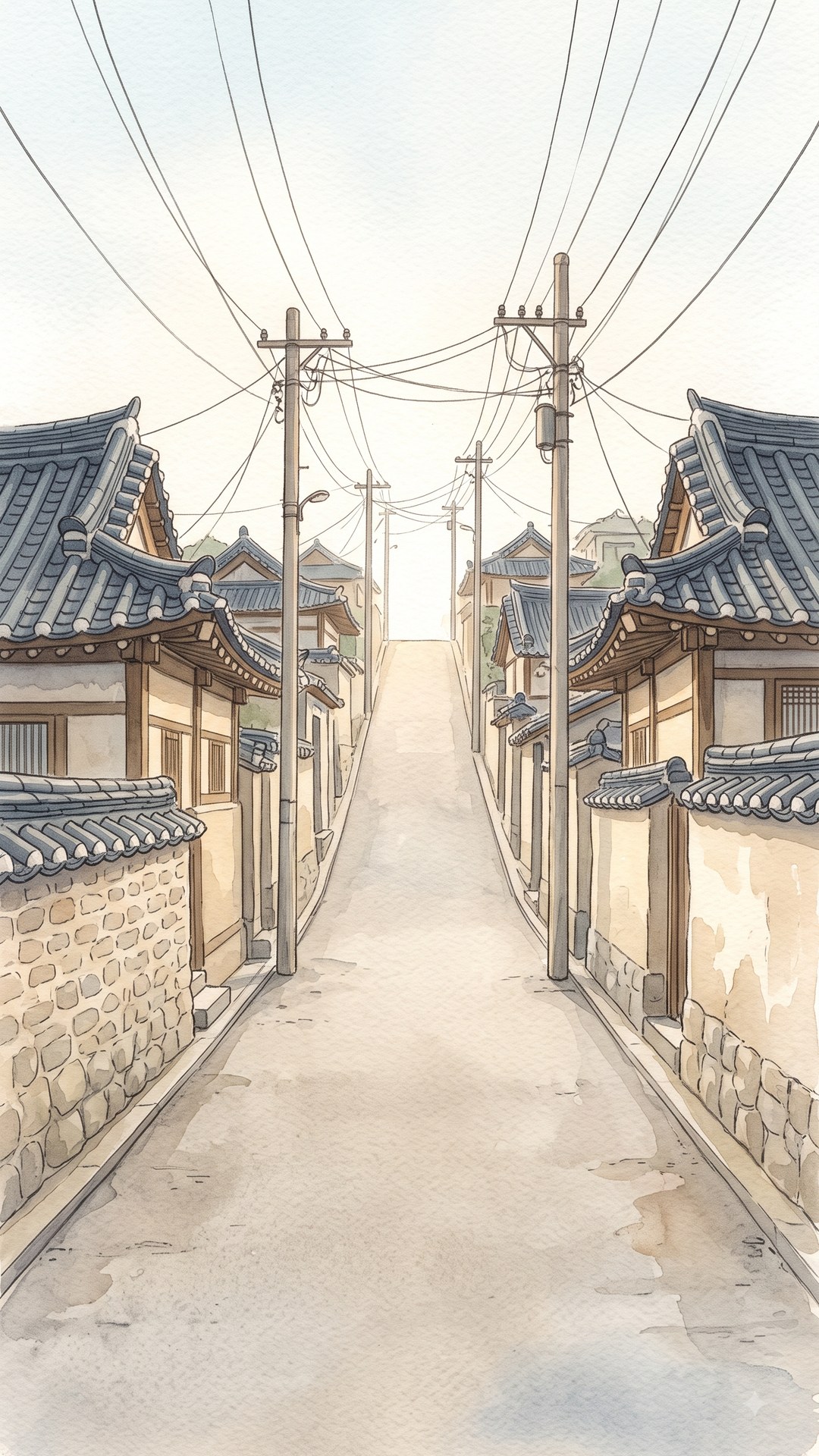
「학교가는 길」의 배경은 수채화풍 그림 한 장입니다. 하늘, 길, 담벼락,
전봇대까지 전부 그 한 장이 그립니다. 처음부터 그렇게 하려던 건 아닙니다. "달리는 게임인데
풍경이 흘러가야지"라는 생각으로 두 번 시도했고, 두 번 다 되돌렸습니다.
지금 게임이 쓰는 배경 — 이 한 장이 하늘·길·담벼락을 다 그린다
1차: 진짜 3D 소품
나무, 전봇대, 화분을 3D 모델로 만들어 길가에 세우고 트랙과 함께 흘려보냈습니다.
인스턴싱으로 드로우콜도 아꼈고, 자리마다 항상 같은 모양이 나오도록 결정론적으로
배치했습니다. 기술적으로는 잘 돌아갔습니다. 문제는 재질이었습니다. 일반적인
3D 조명을 받는 메시 — 그림자와 하이라이트가 있는 CG 룩 — 를 손그림 옆에 놓는 순간,
그것은 다른 매체로 읽힙니다. 오려 붙인 것처럼 겉돌았습니다.
2차: 긴 띠 그림
그래서 재질을 맞췄습니다. 배경과 같은 붓으로 그린 긴 띠 그림을 길 양옆에 세워 흘렸습니다.
평면에 그림을 붙였으니 매체는 같아졌습니다. 이번엔 깊이가 문제였습니다.
그림 속에서는 담 뒤의 집이 담보다 멀고 그 뒤 언덕은 더 먼데, 판 한 장에 붙이면 전부
같은 거리에 서 버립니다. 골목이 아니라 양옆이 막힌 복도가 됐습니다.
결론: 그림 한 장이 하는 일이 생각보다 크다
둘을 되돌리고 나서 정지된 그림 한 장으로 돌아갔더니, 사용자 평이 "처음 버전의 그림이
멈춰 있는 게 훨씬 낫다"였습니다. 손으로 그린 원근이 깊이를 만들고 있었던 겁니다. 카메라가
늘 캐릭터 뒤에 붙어 있어서, 캐릭터 하나만은 배경의 원근과 정면으로 다투지 않습니다.
하지만 배경 여기저기 흩어진 물체는 그림 자체의 소실점·명암과 직접 부딪힙니다.
그래서 지금은 배경 그림 한 장 + 3D 트랙(보도블록)만 있습니다. 나중에 다시 시도한다면
답도 이미 알고 있습니다 — 그림을 통째로 세우지 말고, 소품을 하나씩 따로 그려 서로 다른
거리에 세우는 것. 줄이 둘 이상이고 서로 다른 속도로 흐르는 것 자체가 깊이입니다.
그림 속 길과 3D 트랙을 맞추기
배경이 그림이라는 건, 3D 트랙이 그림 속 길과 픽셀 단위로 맞아야 한다는
뜻입니다. "보도블록이 오르막처럼 보인다"는 지적을 세 번 받았는데, 값을 더듬어서는 못
고쳤습니다. 답은 기하였습니다.
평평한 바닥의 소실점은 반드시 눈높이에 찍힙니다. 카메라 내림각 9.6°,
시야각 54°면 평평한 트랙의 소실점은 화면 위에서 33% 자리입니다. 그런데 배경 그림의
골목은 소실점이 46~53%에 있습니다. 이 차이가 "트랙만 솟아 보인다"의 전부였습니다.
거리의 제곱으로 누르면 절대 안 맞습니다. 그건 곡면인데 그림의 길은
직선(평면)입니다. 게다가 정점마다 깎으면 타일 한 장 안에서도 먼 모서리가 더 내려가
타일이 앞으로 기울고, 그 윗면이 공중에 걸린 차양처럼 보입니다.
평면끼리 맞추려면 1차(거리에 비례)여야 합니다. 시야 공간에서 y를 z에
비례해 미는 것은 전단(shear)이고, 전단은 평면을 평면으로 보냅니다. 필요한 기울기는
카메라 내림각의 탄젠트에서 그림 소실점을 탄젠트로 옮긴 값을 뺀 것 — 약 11°였습니다.
기울임의 축은 캐릭터의 월드 위치입니다. 상수로 박으면 카메라가 플레이어를
뒤따르는 지연만큼 어긋나 캐릭터가 뜨고, 카메라 기준으로 매 프레임 재면 에너지가 블록마다
계단처럼 바뀌어 밟을 때마다 길 전체가 오르내립니다. 캐릭터 위치 기준으로 바꾸자
프레임당 튐이 0.7%에서 0.012%로 줄었습니다.
좌우도 마찬가지입니다. 손그림이라 그림 속 길의 중심선이 수직이 아닙니다 — 발밑은
정중앙인데 마루는 오른쪽으로 몇 픽셀 치우쳐 있습니다. 트랙은 완전한 직선이라, 직선 둘을
겹치려면 두 점을 맞춰야 합니다. 거리에 비례해 옆으로 밀어 먼 쪽(소실점)을
맞추는 값 하나, 통째로 옮겨 가까운 쪽(발밑)을 맞추는 값 하나. 회전만으로는 먼 쪽만 맞고
발밑이 어긋나서 "또 왼쪽으로 치우쳤다"가 나옵니다.
눈대중 대신 재는 법
이 값들은 눈으로 맞추는 값이라 왕복이 잦습니다. 그래서 두 가지를 만들었습니다. 하나는
주소에 ?slope= 같은 값을 붙이면 배포 없이 그 자리에서 비교할 수 있게 한 것.
다른 하나는 재는 법 — 트랙의 연석만 남기고 나머지를 숨긴 뒤 형광색으로 렌더하면, 트랙의
좌우 경계가 배경 그림 위에 사다리처럼 찍힙니다. 어느 레인에 블록이 있느냐에 안 흔들리고,
같은 셰이더를 타서 기울기가 그대로 반영됩니다. 그림 쪽 길 경계를 밝기로 자동 검출하는
건 실패했습니다 — 담벼락이 길만큼 밝습니다.
방향이 헷갈리는 값은 양쪽으로 한 칸씩 찍어 보고 고를 것. 한쪽만 보면
"덜 고쳐졌다"와 "반대로 갔다"가 화면에서 똑같이 생깁니다. 8월 25일에 정확히 그 함정에
빠져서 두 값을 다 반대 방향으로 고쳤다가, 다음 날 더 심해진 신고를 받고 되돌렸습니다.
그리고, ?lang=ko 하나가 경사를 몰래 0으로 만들었다
이 모든 조정이 실제로 켜진 적이 없었다는 걸 열흘 뒤에야 알았습니다. 주소의 조정값을
읽는 코드가 Number(q.get('slope'))를 파라미터가 없을 때도 그냥 돌렸는데,
파라미터가 없으면 null이고 Number(null)은 NaN이 아니라
0입니다. 0은 유한한 수라 검사를 통과하고, 경사가 0으로 덮어써집니다. 그 결과
?lang=ko처럼 경사와 무관한 쿼리가 하나라도 붙어 있으면 트랙이 평평해져
하늘로 솟았습니다. 홈페이지에서 "게임 시작하기"를 누르면 언어를 넘기느라 늘
?lang=ko가 붙습니다 — 그러니 정상 경로로 들어온 사람은 전부 이 버그를 봤고,
테스트 링크로 들어간 저희만 못 봤습니다. "테스트 링크로는 맞는데 정상 경로로 들어가면
다르다"는 걸 사용자가 스스로 알아채고서야 잡혔습니다. 고치는 법은 한 줄 — 파싱 전에
그 파라미터가 실제로 있는지부터 확인하는 것.
Two failed backgrounds, and the geometry of one painting
Aug 18, 2026 · The Way to School
The background of The Way to School is a single watercolor-style painting.
Sky, road, walls, power poles — one image draws all of it. That wasn't the plan. "It's a
running game, the scenery should flow," we thought, tried twice, and rolled back twice.
The background the game uses today — this one image draws the sky, the road and the walls
Attempt one: real 3D props
Trees, poles and flowerpots as 3D models, planted along the road and streamed past with
the track. Instanced to save draw calls, placed deterministically so each spot always looked
the same. Technically it worked fine. The problem was material. The moment a
normally lit mesh — shadows, highlights, that CG look — sits next to a hand-painted image, it
reads as a different medium. It floated on top like a sticker.
Attempt two: a long painted strip
So we matched the material: long strips painted in the same brush as the background,
stood along both sides and scrolled. Flat planes with paintings on them — same medium now.
This time the problem was depth. In the painting, the house behind the wall
is farther than the wall and the hill behind it farther still; glued to one plane, they all
stand at the same distance. It stopped being an alley and became a corridor closed on both
sides.
Conclusion: one painting does more than you think
After rolling both back to a single still painting, the verdict was "the first version,
with the picture standing still, is far better." The hand-painted perspective had been doing
the depth all along. Because the camera always sits behind the character, the character
alone never argues with the painting's perspective. But objects scattered through the scene
collide head-on with the painting's own vanishing point and shading.
So today there is one background painting plus the 3D track of paving tiles. If we try
again, we already know the answer: don't stand up whole paintings — draw props one by one
and place them at different distances. Two or more rows moving at different speeds is what
depth is.
Matching the 3D track to the painted road
A painted background means the 3D track has to line up with the road in the painting
pixel for pixel. We heard "the pavement looks uphill" three times and could
not fix it by nudging numbers. The answer was geometry.
A flat floor's vanishing point always lands at eye level. With the
camera tilted down 9.6° at a 54° field of view, a flat track vanishes 33% from the top
of the screen. The alley in the painting vanishes at 46–53%. That gap was the whole
"only the track looks raised" problem.
Pressing the track down by distance squared can never match. That
makes a curve, and the painted road is a straight line — a plane. Worse, bending each
vertex tilts every tile forward, so its top face hangs in the air like an awning.
To fit a plane to a plane, the correction must be linear in distance.
Pushing y in proportion to z in view space is a shear, and a shear maps planes to
planes. The required tilt is the tangent of the camera's pitch minus the painting's
vanishing point converted to a tangent — about 11°.
The pivot of the tilt is the character's world position. Hard-code it
and the camera's follow lag lifts the character off the ground; measure it from the
camera each frame and, because energy changes in steps at every tile, the whole road
bobs with every landing. Pivoting on the character cut per-frame jitter from 0.7% to
0.012%.
Left-right is the same story. Because it is hand-painted, the road's centre line is not
vertical — dead centre at your feet, a few pixels right at the crest. The track is perfectly
straight, so overlaying two lines needs two points: one value that pushes
sideways in proportion to distance to match the far end, and one that shifts the whole
track to match the near end. Rotation alone fixes the far end and leaves your feet off —
hence "it drifts left again".
Measuring instead of eyeballing
These are values you tune by eye, so the round trips add up. Two things helped. First,
appending something like ?slope= to the URL applies the value on the spot with
no deploy. Second, a way to measure: hide everything except the track's kerb and render it
in a fluorescent colour, and the track's edges print onto the painting like a ladder — it
doesn't move with which lane has tiles, and it runs through the same shader so the tilt is
reflected exactly. Detecting the painted road's edges automatically by brightness failed:
the walls are as bright as the road.
When a value's direction is ambiguous, try one step each way before choosing.
Look at only one side and "not fixed enough" and "went the wrong way" look identical on
screen. On August 25 we fell into exactly that trap, moved both values the wrong way, got a
worse report the next day, and reverted.
And then, ?lang=ko silently set the slope to zero
Ten days later we found out that none of this tuning had ever been switched on for real
players. The code reading tuning values from the URL ran Number(q.get('slope'))
even when the parameter was absent. Absent means null, and
Number(null) is 0, not NaN. Zero is a finite number, so it passed
validation and overwrote the slope. Any unrelated query — such as ?lang=ko —
flattened the track and sent it into the sky. And the home page's "Play" button always
appends ?lang= to pass the language along, so every player who came in the
normal way saw the bug, and only we, entering through test links, never did. It was caught
only when a user noticed "it's right from the test link but different from the normal
path". The fix is one line: check that the parameter exists before parsing it.